Branded lens
Review searches that identify the brand, domain or closely associated offering without treating every click as newly created demand.
SeattleSEO.us review worksheet
Use two Search Console lenses to distinguish existing brand demand from broader discovery, while recording filter limits and business context.
Practical guidance
A combined search total can hide two different jobs. Branded queries often reflect people who already know the business; non-branded queries can show how people discover topics, services or problems without naming the brand. Separate the views, then interpret each against the pages and customer decisions it represents. This is a review method—not a report of SeattleSEO.us traffic or proof that one channel caused a business result.
By SeattleSEO.us · Updated
Review searches that identify the brand, domain or closely associated offering without treating every click as newly created demand.
Review general service, problem and research searches without assuming every impression is commercially relevant.
Use the same search type, dates and page scope, then record filter availability, omitted data and business changes.
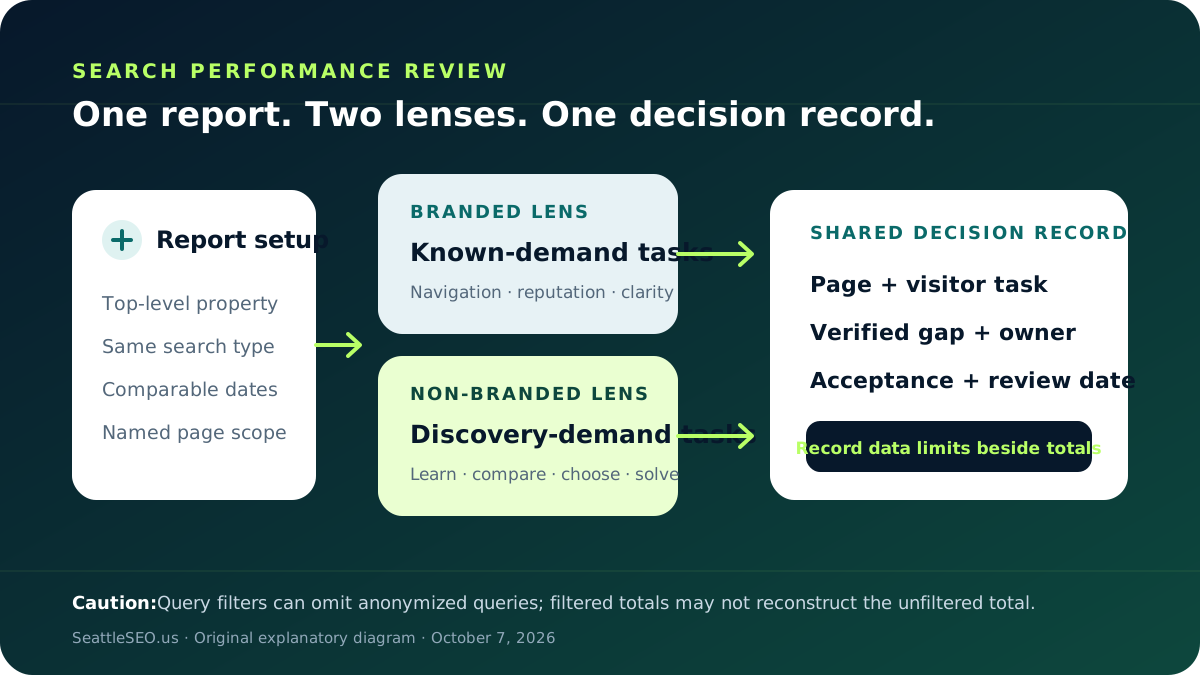
Choose the top-level Search Console property, one search type and a date range that matches the decision. Write those settings down before applying a query filter. If you compare periods, use comparable windows and annotate launches, promotions, migrations, outages or seasonal events. Keep the first review at property level; narrow to a page only when the question requires it.
Google's branded and non-branded query filter is available to eligible top-level properties and separates queries using the brand name, variants, misspellings and associated products or services. Google also says the classification is informational, can be imperfect and does not affect ranking. Record whether the built-in filter is present rather than pretending every property has it.
If the built-in filter is unavailable, list verified brand forms before creating a query filter: the business name, domain without punctuation, common abbreviations, distinctive products and known misspellings. Search Console supports containing, excluding and RE2 regular-expression filters. Save the expression with the review so another analyst can reproduce it. Do not add generic service terms merely because the business wants to own them; that would move discovery queries into the branded group.
Record the landing pages and visible query themes that identify the business. Look for practical issues: an outdated title, a weak homepage explanation, an incorrect location page, a missing login or contact path, or a result that sends known customers to the wrong place. A strong branded result may reflect existing reputation or other marketing. Do not present it as proof that SEO created the demand.
Group visible queries by the task a searcher is trying to complete: learn, compare, find a provider or solve a specific problem. Then inspect the pages receiving those impressions or clicks. Choose a page-level action only when the business truly serves the need and the page has a verifiable gap. Avoid turning every phrase into a new page; one strong page may answer a family of closely related questions.
Google omits anonymized queries from query tables to protect privacy, and query filters can remove those queries from chart totals. The table is also limited and may not show every row. Therefore a filtered branded value plus a filtered non-branded value should not be treated as a guaranteed reconstruction of the unfiltered total. Write the limitation beside the numbers, not in a forgotten footnote.
Record: (1) property, search type and dates; (2) filter method and exact definition; (3) leading branded page-task pairs; (4) leading non-branded page-task pairs; (5) one verified page or measurement gap; and (6) the owner, acceptance check and next review date. Mark unavailable metrics as unavailable. Keep customer identities and private query context out of the worksheet.
Suppose branded clicks rise during a promotion while non-branded impressions are stable. The useful next step may be to verify that branded visitors reach the correct offer or contact path—not to claim an organic acquisition win. If a non-branded service page earns relevant impressions but leaves a common eligibility question unanswered, improving that answer may be the clearer content action. This example is illustrative, not a SeattleSEO.us result or forecast.
Use these points to record findings and decide what needs attention.
Questions, answered
It can provide one view of searches that explicitly reference the brand, but it is not a complete measure of awareness. Offline activity, advertising, referrals and repeat customers may influence it, while Search Console does not reveal every query.
Record that limitation. Google says the filter is unavailable for sub-properties and sites with low impression volume. An authorized analyst can use carefully documented query filters or regex as an approximation, while noting omitted anonymized queries and likely brand variants.
Do not assume they will. Google documents that query filters can change totals because anonymized queries are omitted and table data can be truncated.